UX Design, Prototyping
Analyst home page - Viva Insights
Improved discoverability, engagement, and workflow completion for analysts by redesigning the advanced insights homepage.
Timeline
Sep 2023 - Mar 2024
Problem
Advanced analysis offers powerful capabilities, but analysts especially new or infrequent users often struggle to:
Discover the right analysis or Power BI template to start with
Understand where to begin their workflows
Confidently return and reuse advanced analysis workflows
This created friction in adoption and reduced repeat usage of advanced analysis features.
Design Goals
Improve discoverability of analysis entry points and templates
Increase the adoption of the product by helping the analysts to run the right queries.
Deliver a more consumer‑grade experience for enterprise analysts
Solution
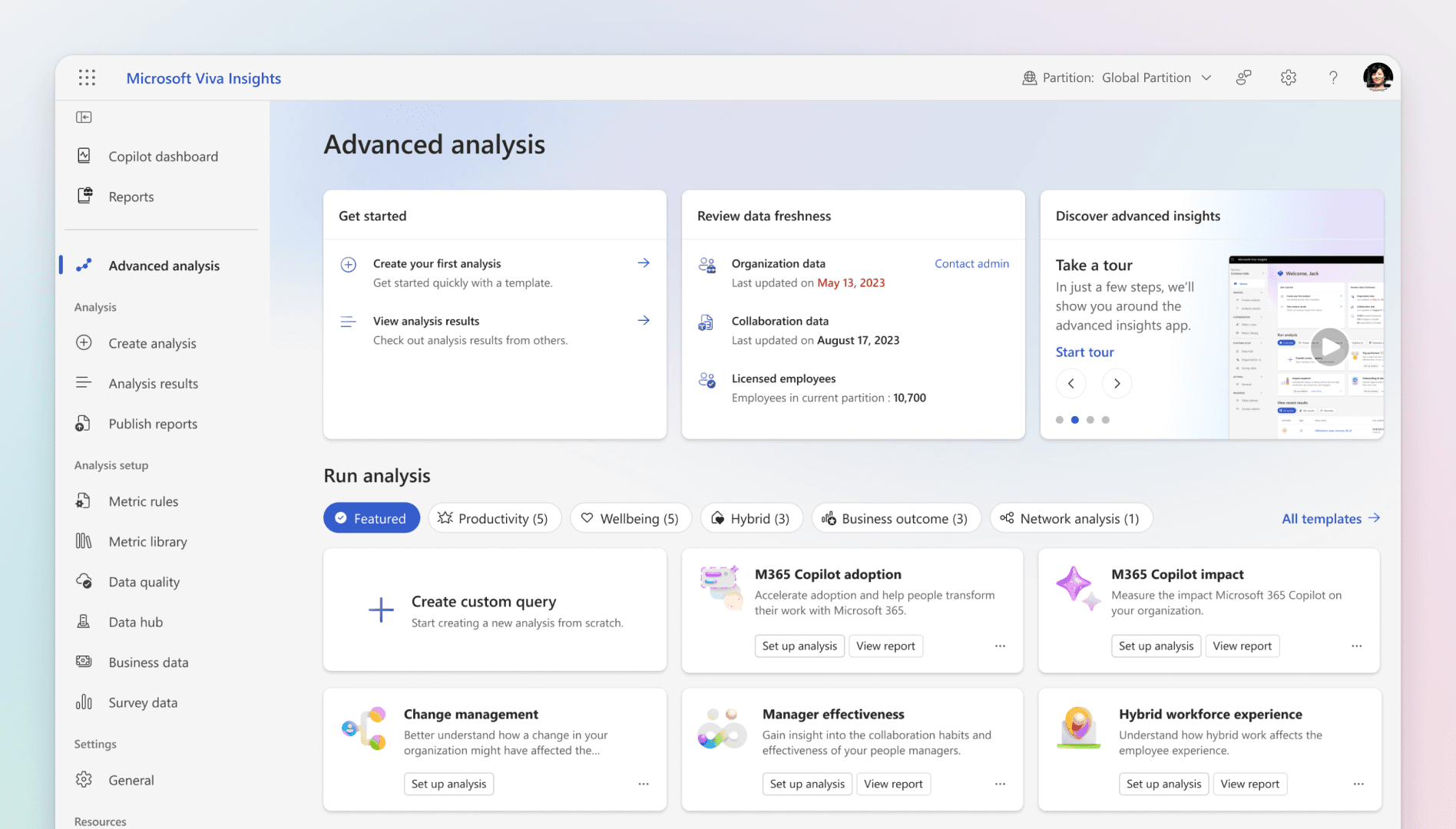
To improve discoverability and retention in Advanced analysis, we designed a clear homepage structure that helps analysts get started quickly, resume ongoing work, and consume results without friction, while staying aligned with the capabilities.
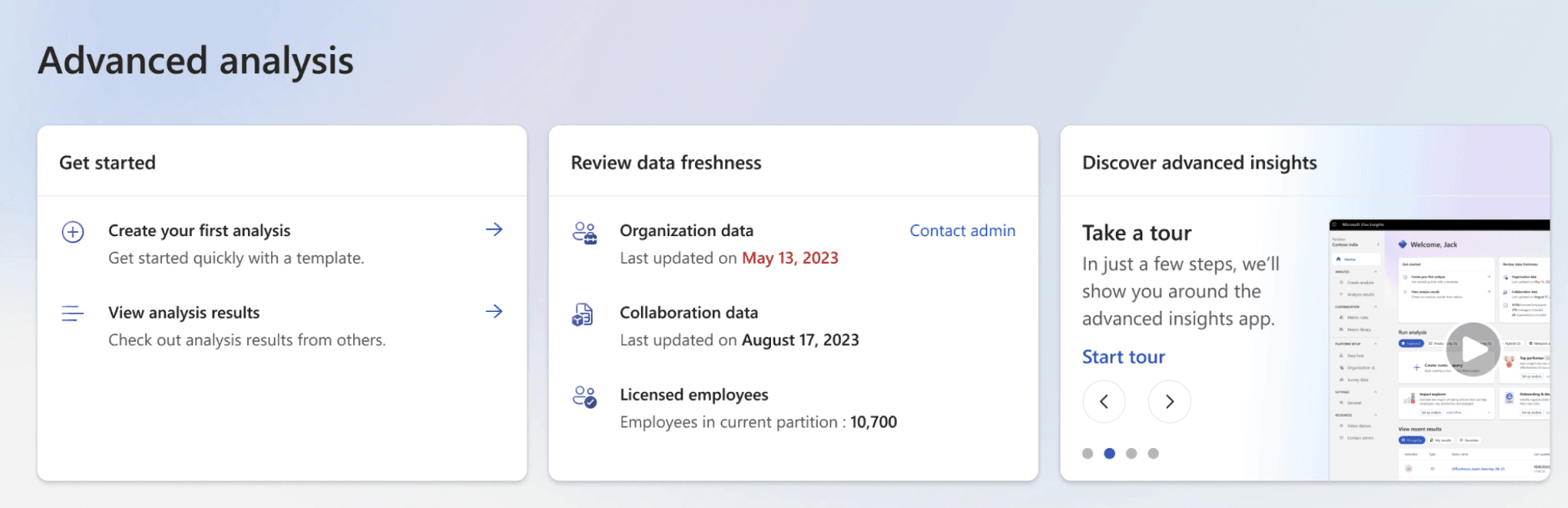
Get started or continue where you left off
The homepage acts as a clear starting point for Advanced analysis. Analysts can either begin their first analysis or return to previously run analyses, reducing the effort needed to re‑orient themselves. To support confidence and trust in the data, the page surfaces organizational data freshness and data quality signals, helping analysts stay aware of the state of their data before running or reusing analyses.
Create analysis from scratch or use prebuilt templates
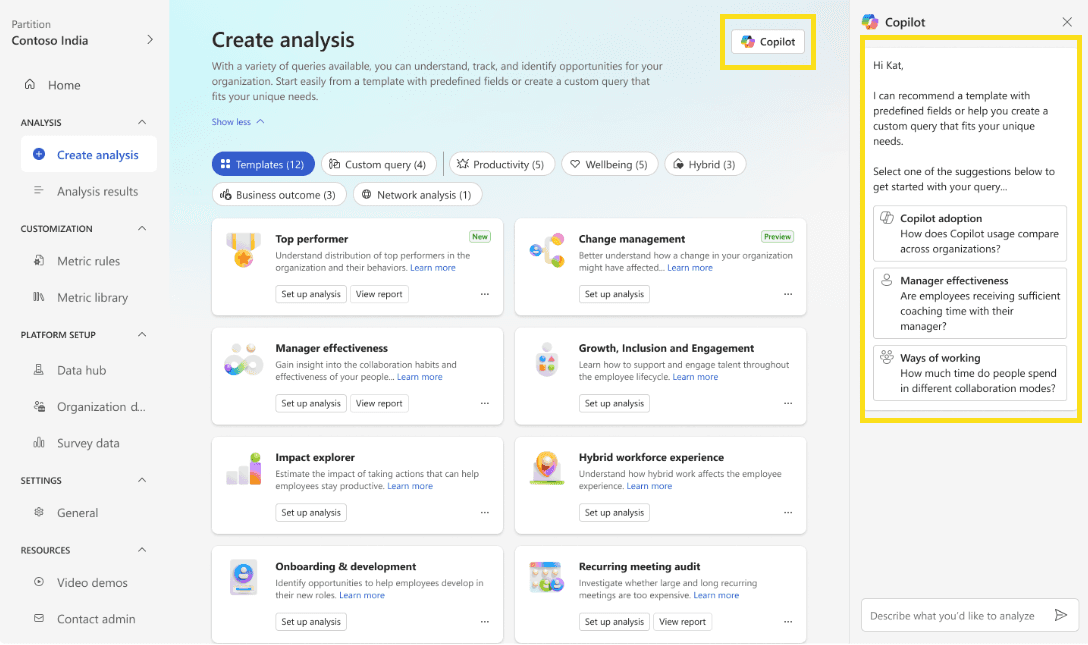
From the homepage, analysts can choose how they want to begin:
Create analysis from scratch by setting up custom queries.
Get started faster with 20+ predefined Power BI templates, designed to answer common business and Copilot‑related questions.
This structure lowers the barrier for new analysts while still supporting experienced users who prefer full control, reflecting Microsoft Learn’s positioning of Advanced analysis as both powerful and flexible.
Consume and share results with ease
A dedicated Results section allows analysts to return to completed analyses and focus on consumption rather than setup.
From here, they can:
View analysis results
Download outputs in supported formats
Reuse or build on existing analyses
This completes the loop from creation → results → reuse, encouraging repeat usage and long‑term adoption of Advanced analysis.
Impact
Improved discoverability of advanced analysis templates and entry points
Increased adoption of advanced analysis workflows
Higher user retention driven by clearer starting points and repeat usage
Contributed to a more consumer‑grade analytics experience within Viva Insights
Why This Matters
Advanced analysis is the place where analysts run deeper, customizable analyses and share insights with leaders.
By improving the Analyst Home Page, this work helps bridge the gap between powerful analytics capabilities and everyday usability, making advanced analysis easier to start, understand, and return to.
NDA & Sharing Note
This case study is intentionally high‑level and based on public Microsoft Learn documentation.
Detailed flows, visuals, and implementation specifics are not shared publicly and can be discussed 1:1 where appropriate.
UX Design, Prototyping
Analyst home page - Viva Insights
Improved discoverability, engagement, and workflow completion for analysts by redesigning the advanced insights homepage.
Timeline
Sep 2023 - Mar 2024
Problem
Advanced analysis offers powerful capabilities, but analysts especially new or infrequent users often struggle to:
Discover the right analysis or Power BI template to start with
Understand where to begin their workflows
Confidently return and reuse advanced analysis workflows
This created friction in adoption and reduced repeat usage of advanced analysis features.
Design Goals
Improve discoverability of analysis entry points and templates
Increase the adoption of the product by helping the analysts to run the right queries.
Deliver a more consumer‑grade experience for enterprise analysts
Solution
To improve discoverability and retention in Advanced analysis, we designed a clear homepage structure that helps analysts get started quickly, resume ongoing work, and consume results without friction, while staying aligned with the capabilities.
Get started or continue where you left off
The homepage acts as a clear starting point for Advanced analysis. Analysts can either begin their first analysis or return to previously run analyses, reducing the effort needed to re‑orient themselves. To support confidence and trust in the data, the page surfaces organizational data freshness and data quality signals, helping analysts stay aware of the state of their data before running or reusing analyses.
Create analysis from scratch or use prebuilt templates
From the homepage, analysts can choose how they want to begin:
Create analysis from scratch by setting up custom queries.
Get started faster with 20+ predefined Power BI templates, designed to answer common business and Copilot‑related questions.
This structure lowers the barrier for new analysts while still supporting experienced users who prefer full control, reflecting Microsoft Learn’s positioning of Advanced analysis as both powerful and flexible.
Consume and share results with ease
A dedicated Results section allows analysts to return to completed analyses and focus on consumption rather than setup.
From here, they can:
View analysis results
Download outputs in supported formats
Reuse or build on existing analyses
This completes the loop from creation → results → reuse, encouraging repeat usage and long‑term adoption of Advanced analysis.
Impact
Improved discoverability of advanced analysis templates and entry points
Increased adoption of advanced analysis workflows
Higher user retention driven by clearer starting points and repeat usage
Contributed to a more consumer‑grade analytics experience within Viva Insights
Why This Matters
Advanced analysis is the place where analysts run deeper, customizable analyses and share insights with leaders.
By improving the Analyst Home Page, this work helps bridge the gap between powerful analytics capabilities and everyday usability, making advanced analysis easier to start, understand, and return to.
NDA & Sharing Note
This case study is intentionally high‑level and based on public Microsoft Learn documentation.
Detailed flows, visuals, and implementation specifics are not shared publicly and can be discussed 1:1 where appropriate.